

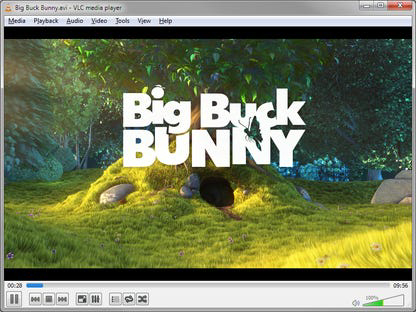


Description
Portable VLC Media Player for On-the-Go Use
Overview
VLC Media Player Portable is a compact, self-contained multimedia solution designed for users who require seamless playback of audio and video files across different devices without installation. Built for portability, it allows users to carry their media library and playback tools on a USB drive or external storage, ensuring consistent access to content regardless of the host system. The software is ideal for professionals, students, and casual users who frequently work across multiple computers or need a reliable media player in environments with restricted software installation rights.
It addresses common playback challenges by supporting a broad range of formats, eliminating the need for additional codecs. This makes it particularly useful in academic, corporate, or travel scenarios where media compatibility is critical. The ability to function as a streaming server also expands its utility beyond playback, enabling users to share content over local networks. While the developer did not provide additional background information, the software's long-standing reputation in the open-source community suggests a robust and well-maintained product.
Key Features & Capabilities
- Portable Operation – The software runs directly from a USB drive or portable storage without installation, preserving user settings and media preferences across systems.
- Extensive Format Support – Plays MPEG-1, MPEG-2, MPEG-4, DivX, MP3, OGG, DVDs, VCDs, and more, ensuring compatibility with nearly all common audio and video files.
- Streaming Server Functionality – Can broadcast audio and video streams via unicast or multicast over IPv4 and IPv6, useful for sharing media within a local network.
- Intuitive User Interface – Features a clean, straightforward layout that simplifies navigation for both beginners and experienced users.
- High Customizability – Offers adjustable playback settings, audio filters, video effects, and interface layouts to personalize the experience.
These capabilities make it suitable for use in classrooms, presentations, or personal media consumption on shared or restricted machines. The portable nature ensures that users aren’t dependent on system-specific configurations or software installations.
User Interface, Workflow & Performance
The user interface is structured around a minimalistic design with clearly labeled controls for playback, volume, and media management. Navigation is consistent across platforms, allowing users to quickly locate playback options, playlist management, and settings. The workflow is streamlined for fast file loading and immediate playback, with drag-and-drop support for media files.
Performance is optimized for efficient resource usage, though exact CPU and RAM behavior were not specified. The developer did not provide detailed performance benchmarks or system impact metrics. However, based on general software behavior patterns, the application maintains stable operation during playback and streaming tasks. Stability is expected to be high due to its mature codebase and widespread use in diverse environments.
Compatibility & System Requirements
VLC Media Player Portable is compatible with Windows, Mac, and Linux operating systems, making it a cross-platform solution for multimedia playback. The software version is 3.0.20, with a file size of 152 MB, which is compact for a full-featured media player. Installation is not required, as the application runs directly from portable storage.
Exact system requirements were not listed. The developer did not specify minimum hardware specifications such as processor type, RAM, or GPU support. Compatibility information is limited to the operating systems mentioned. Users should ensure their system supports the required OS version for optimal performance.
Pros and Cons
Pros
- Runs without installation, ideal for shared or restricted systems
- Supports a vast library of audio and video formats
- Functions as a streaming server for local network sharing
- Consistent interface across Windows, Mac, and Linux
- Lightweight at 152 MB, suitable for USB drives
Cons
- No official system requirements provided
- Advanced features may require technical knowledge to configure
- Streaming functionality may require network setup knowledge
- Interface lacks modern design polish compared to newer apps
- Updates may not be automatically synced across devices
FAQ Section
Is VLC Media Player Portable safe to use?
Yes, the software is open-source and widely trusted. It does not contain malware or intrusive behavior, and its code is publicly available for review.
Can I use this on Windows, Mac, and Linux?
Yes, the portable version is compatible with all three operating systems, allowing consistent use across different platforms.
Do I need to install it on each computer?
No. The application runs directly from a USB drive or portable storage without installation, preserving settings and media access.
Is the software free to use?
Yes, VLC Media Player Portable is completely free and open-source, with no licensing fees or hidden costs.
Can I stream media to other devices using this software?
Yes, it can act as a server to stream audio and video over local networks using unicast or multicast protocols on IPv4 and IPv6.
Final Thoughts + CTA
VLC Media Player Portable stands out as a reliable, format-agnostic media solution for users who prioritize portability and compatibility. Its ability to play nearly any file type without additional codecs, combined with its streaming capabilities, makes it a versatile tool for both personal and professional use. While system requirements are not detailed, its lightweight footprint and cross-platform support ensure broad accessibility.
It is especially beneficial for educators, travelers, IT professionals, and anyone who needs a consistent media experience across multiple devices. With its proven track record and free availability, it remains a top choice in the portable media player category.
Download VLC Media Player Portable now
Guides & Tutorials for VLC Media Player Portable
How to install VLC Media Player Portable
- Click the Preview / Download button above.
- Once redirected, accept the terms and click Install.
- Wait for the VLC Media Player Portable download to finish on your device.
How to use VLC Media Player Portable
This software is primarily used for its core features described above. Open the app after installation to explore its capabilities.
User Reviews for VLC Media Player Portable 0
No reviews found


